Pretraining vs Data Augmentation: What Matters More for Semantic Segmentation on a Laptop?
TL;DR: On a small semantic segmentation task (Oxford-IIIT Pet) trained on a MacBook, ImageNet pretraining clearly helped more than heavier data augmentation. Pretraining gave me ~+3.8 mIoU points on average with essentially the same training time. Heavy augmentation was almost a wash.
Why I Ran This Experiment
Semantic segmentation models are usually trained on big GPUs with big datasets. But most of us don’t live inside a datacenter — we live on laptops.
I wanted to answer a simple, practical question:
If you only have a small GPU (in my case: an M1 MacBook Pro) and a few hours, what should you spend your limited budget on: pretraining or heavier data augmentation?
Both are classic “performance knobs”:
- Pretraining: Start from an encoder that was trained on ImageNet instead of random weights.
- Data augmentation: Flip, crop, rotate, jitter, and generally thrash your images to help the model generalize.
Rather than chasing state-of-the-art numbers, I framed this as a trade-off question under tight compute. I picked a small dataset, a lightweight model, and four simple configurations, then measured both accuracy (mIoU) and training time.
Experimental Setup
Task & Dataset: Oxford-IIIT Pet Segmentation
I used the Oxford-IIIT Pet dataset, which has photos of 37 cat and dog breeds. Each image comes with a pixel-wise trimap mask (background/pet/boundary), making it a nice, compact segmentation benchmark.
For this experiment:
- I resized images to 192×192.
- I treated the trimap as a 3-class segmentation problem: background, pet, boundary.
- I split the data into train/validation/test.
This keeps the problem interesting (non-trivial shapes and textures) but small enough to run comfortably on a MacBook.
Hardware & Framework
- Machine: M1 MacBook Pro
- Framework: PyTorch with the
mpsbackend - Training time per run: ~21–23 minutes
So the full 4-config grid fits into a few hours of wall-clock time.
Model: Tiny U-Net with ResNet18 Encoder
To avoid spending time reinventing architectures, I used segmentation_models_pytorch and built a lightweight U-Net:
- Encoder: ResNet18
- Decoder: Standard U-Net-style upsampling path
- Input channels: 3
- Output classes: 3 (background, pet, boundary)
The key part for this experiment is that the encoder can be:
- Initialized from ImageNet weights (pretrained), or
- Initialized with random weights (scratch).
Everything else about the model stays fixed.
Loss Function & Metric
- Loss:
0.5 * CrossEntropyLoss + 0.5 * DiceLoss - Main metric: mean Intersection over Union (mIoU) on the test set
Dice loss tends to help with class imbalance and improves boundary quality a bit, while cross-entropy is a solid default. I didn’t tune this combination; it’s the same for all runs.
Training Hyperparameters
Same for all 4 configs:
- Epochs: 20
- Batch size: 4
- Optimizer: Adam (lr = 1e-3, weight decay = 1e-4)
- Input size: 192×192
I tracked:
- Training and validation loss per epoch
- Validation mIoU per epoch (to pick the best checkpoint)
- Final test mIoU
- Total training time for each configuration
What I Varied: Pretraining vs Data Augmentation
I ran a 2×2 grid over two binary choices: pretraining and augmentation strength.
Axis 1: Pretraining
- Scratch: encoder initialized with random weights
- Pretrained: encoder initialized with ImageNet weights
Axis 2: Data Augmentation
I defined two simple augmentation pipelines.
Light Augmentation Applied to the training images (geometric changes applied equally to image and mask):
- Random horizontal flip (p = 0.5)
- Random resized crop (scale between 0.8 and 1.0)
- Normalization using ImageNet mean/std
Heavy Augmentation
Everything from Light, plus:
- Stronger random resized crop (scale 0.6 to 1.0)
- Random rotation (up to ±20°)
- Color jitter (brightness/contrast/saturation shifts)
- Optional light Gaussian blur (on images only)
The goal wasn’t to design the perfect augmentation policy, just a clearly “lighter” vs “heavier” pair.
The Four Configurations
Putting these together, I get four configurations:
- C1: Scratch + Light Aug
- C2: Scratch + Heavy Aug
- C3: Pretrained + Light Aug
- C4: Pretrained + Heavy Aug
Everything else about the training is identical.
Results
Test mIoU by Configuration
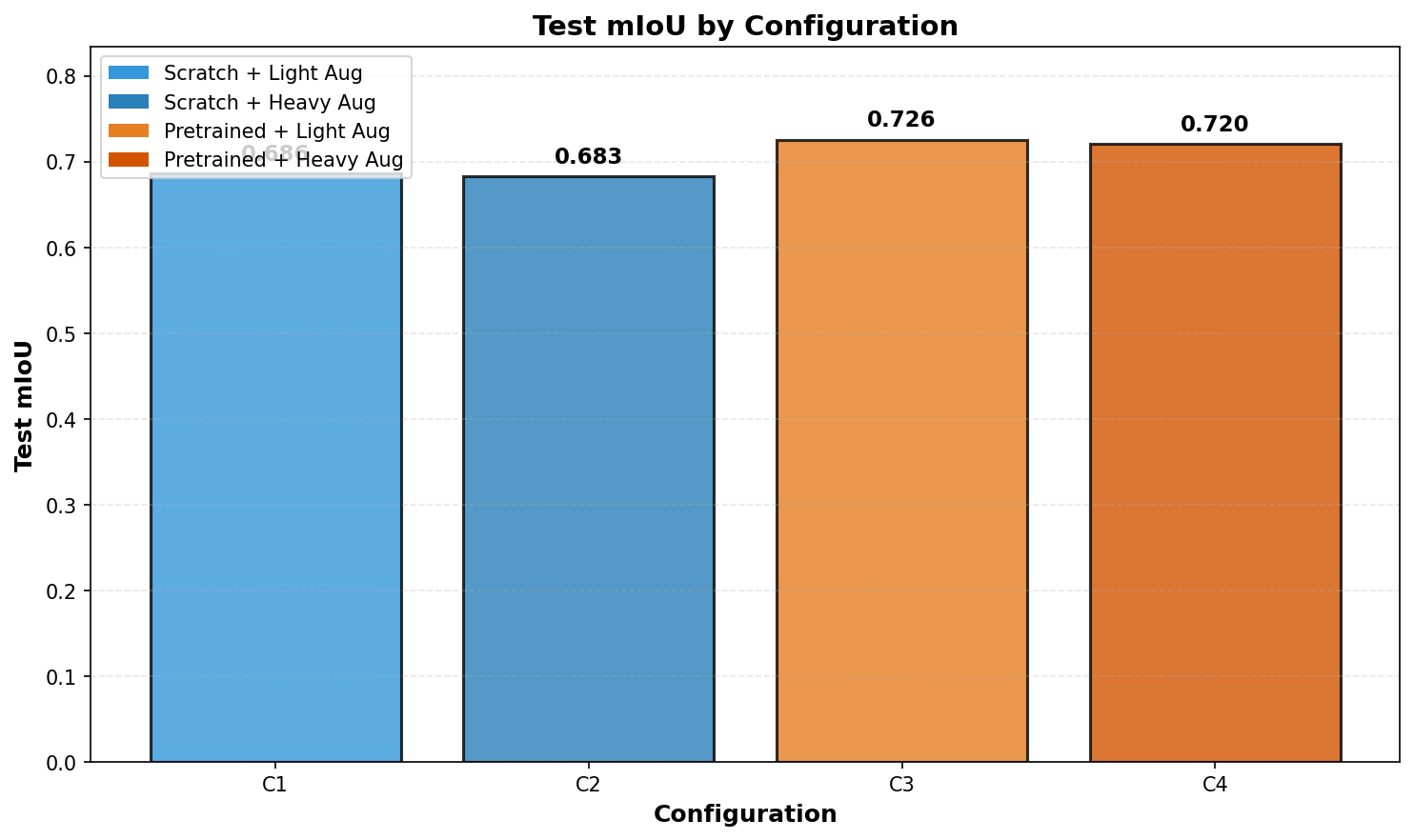
Here are the final test mIoU scores for each config:
- C1 (Scratch + Light): 0.6862
- C2 (Scratch + Heavy): 0.6829
- C3 (Pretrained + Light): 0.7255
- C4 (Pretrained + Heavy): 0.7203
A few immediate observations:
- Both pretrained configurations (C3, C4) beat both scratch configurations (C1, C2) by a clear margin.
- Within scratch-only (C1 vs C2) and pretrained-only (C3 vs C4) pairs, heavy augmentation didn’t help; if anything, it nudged mIoU down slightly.
Ablation: Pretraining vs Heavy Augmentation
To isolate the effect of each knob, I took simple averages.
Effect of Pretraining
- Scratch average: (C1 + C2) / 2 = 0.685
- Pretrained average: (C3 + C4) / 2 = 0.723
So pretraining gave me roughly +0.038 mIoU (3.8 absolute points) on average.
Effect of Heavy Augmentation
- Light average: (C1 + C3) / 2 = 0.706
- Heavy average: (C2 + C4) / 2 = 0.702
Heavy augmentation was basically a wash, slightly worse than light.

- Left panel: Pretrained vs scratch (pretraining clearly wins)
- Right panel: Light vs heavy augmentation (almost equal)
Training Time: How Much Compute Did This Cost?
Each configuration took about the same time to train:
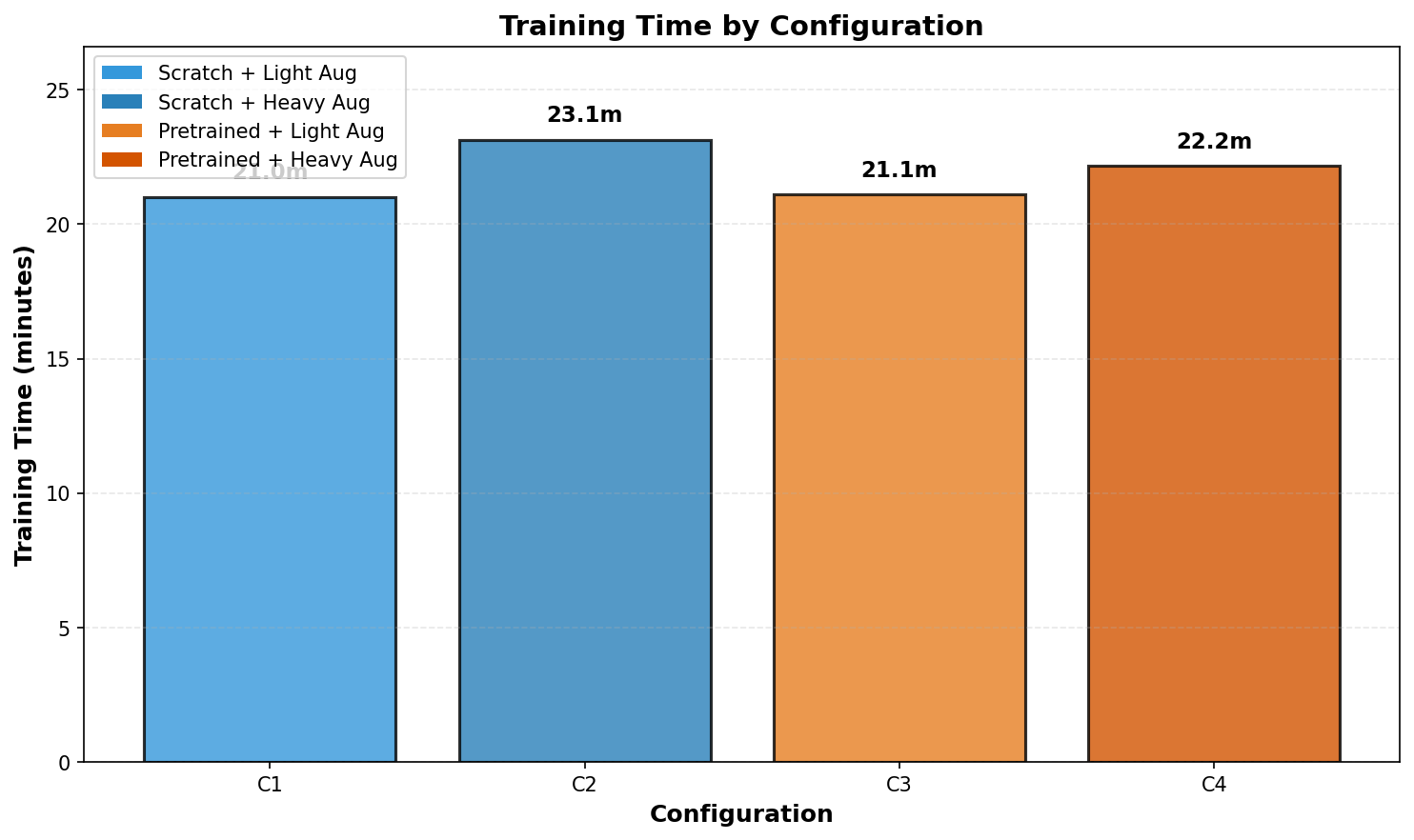
- C1 (Scratch + Light): 21.0 minutes
- C2 (Scratch + Heavy): 23.1 minutes
- C3 (Pretrained + Light): 21.1 minutes
- C4 (Pretrained + Heavy): 22.2 minutes
A couple of things worth noting:
- Pretraining did not make training slower in this setup; loading ImageNet weights is a one-time cost.
- Heavy augmentation added only a small overhead (crop/rotation/jitter are cheap compared to the model forward pass).
Bang for Buck: mIoU vs Training Time
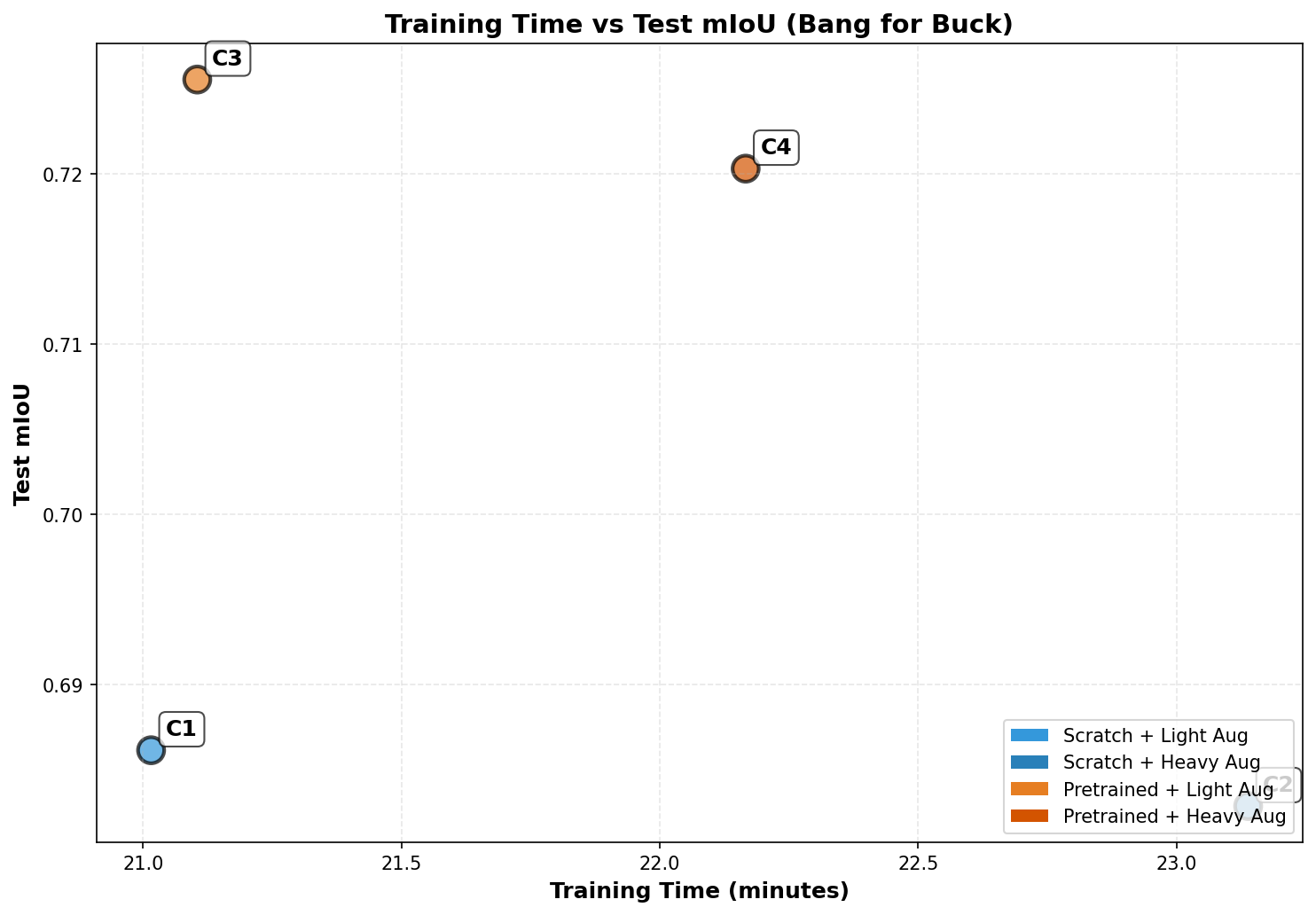 I plotted test mIoU vs training time. Each point is one config (C1–C4).
A clean story emerges:
- C3 (Pretrained + Light) sits at the top-left: best accuracy and one of the fastest runs.
- C4 (Pretrained + Heavy) is slightly slower and slightly worse than C3.
- C1/C2 (Scratch) are both slower per unit of quality: they take similar time but land ~3.5–4 mIoU points lower.
If you care about accuracy per minute of training, C3 is the clear winner.
Qualitative Results
Numbers are nice, but segmentation is more visual, so I looked at predictions on a small test set.
 The plot shows, for six different examples:
- The input image
- The ground truth mask
- C1 prediction (Scratch + Light)
- C2 prediction (Scratch + Heavy)
- C3 prediction (Pretrained + Light)
- C4 prediction (Pretrained + Heavy)
A few qualitative patterns I noticed:
Scratch configs (C1, C2) sometimes:
- Miss thin structures like tails or legs
- Produce chunkier, less sharp boundaries
- Occasionally, leave small holes or gaps inside the pet region
Pretrained configs (C3, C4) generally:
- Capture the overall pet shape more cleanly
- Produce smoother, more consistent masks
- Handle odd poses or weird lighting a bit better
Heavy augmentation didn’t produce obviously better masks:
- In some examples, C2/C4 looked a tad noisier than C1/C3
- The gains (if any) were subtle compared to the jump from scratch to pretrained
Overall, the visuals match the metrics: pretraining is the big lever, while my version of “heavy augmentation” didn’t give a clear win.
Takeaways for Practitioners on Low Compute
If you’re training a semantic segmentation model on a modest machine (like a MacBook, gaming laptop, or small cloud instance), here’s what I’d do based on this experiment.
1. Always Start with a Pretrained Encoder
If you can get a pretrained backbone, use it:
- You get a noticeable accuracy boost (+3–4 mIoU points here).
- You don’t pay an ongoing compute cost; it’s just different initialization.
- You converge faster and to a better solution with the same number of epochs.
In other words: pretraining is basically free performance.
2. Use Simple, Robust Augmentation Before Getting Fancy
Basic geometric augmentations (flip + crop) are cheap and safe. In this experiment, going from light to “heavy” augmentation didn’t help and sometimes slightly hurt.
That doesn’t mean heavy augmentation is bad; it just means:
- It’s not automatically better.
- The details matter: which transforms, strengths, and probabilities.
If you’re on tight compute, I’d start with:
- Random horizontal flips
- Mild random resized crops
- Normalization
Only then would I layer in rotations, color jitter, or more exotic methods if I still see overfitting.
3. Don’t Overthink the Model (At First)
A simple U-Net with a good encoder gave solid performance here. Before trying to squeeze out tiny gains with custom architectures, you’ll often get more value from:
- Better initialization (pretraining)
- Cleaner data and labels
- Sensible training schedules
4. This Whole Experiment Fits on a Laptop
One neat side effect: this 4-config grid was completely feasible on an M1 MacBook Pro:
- ~21–23 minutes per config
- 4 configs = under 1.5 hours of pure training time
- The rest of the time went into coding, plotting, and writing
You don’t need a massive GPU cluster to do meaningful empirical work in computer vision.
Limitations & Next Steps
This is a small, focused experiment, and there are plenty of things I didn’t explore.
Some obvious caveats:
- Single dataset: Oxford-IIIT Pet is small and somewhat clean. Results might differ on street scenes, medical images, or very noisy labels.
- Single architecture: I used one backbone (ResNet18 U-Net). Larger or different architectures (e.g., MobileNet, DeepLab-like decoders, transformers) might react differently.
- Limited augmentation design: My “heavy” pipeline was just a slightly amped-up version of the light one, not a carefully tuned policy.
- No label-efficiency curves: I trained on the full dataset; it would be interesting to see how pretraining vs augmentation behaves when you only have 10, 50, or 100 labeled images.
If I extend this project, I’d like to:
- Vary the amount of labeled data and compare pretraining vs augmentation when data is scarce.
- Try different resolutions to see how much performance you lose by shrinking images to go faster.
- Experiment with more advanced augmentations (Mixup/CutMix/Copy-Paste) and see if they matter more at higher resolutions or with bigger models.
Conclusion
For this small, laptop-friendly segmentation experiment, the answer to my original question is pretty clear:
If you only have time to turn one knob, turn on pretraining.
ImageNet pretraining gave a solid, consistent boost in test mIoU with almost no downsides. My heavier augmentation recipe, on the other hand, was mostly neutral.
The broader lesson: even under tight compute, you can still do meaningful, well-scoped experiments in computer vision. And if you frame them around practical trade-offs — like “accuracy per minute of training” — the results can be immediately useful for anyone training models on a single machine.
Try a similar setup on another dataset from my repository or with a different backbone. I’d be very curious to see whether pretraining still dominates, or if augmentation plays a bigger role there.