Stormlog on Apple Silicon: fixing a real PyTorch memory leak from first signal to final fix
I built Stormlog after hitting the same problem too many times: memory debugging in training jobs kept turning into a fragmented workflow of ad hoc counters, partial profilers, logs that disappeared with the run, and artifacts that were hard to revisit later.
I wanted one toolkit that could track memory live, save telemetry, analyze it after the fact, bundle diagnostics, export visualizations, and reload the same evidence in a TUI.
This post is the first walkthrough I would give someone who wants to understand what Stormlog is actually for. The setup is deliberately small: a synthetic PyTorch classification task on Apple Silicon, a leak that looks plausible in real training code, and a fix that preserves debuggability without preserving device memory pressure.
If you want to follow along exactly, the companion code for this walkthrough includes the full runnable scripts and environment setup.
Install and setup
The companion repo includes an environment.yml, so setup is straightforward:
conda env create -f environment.yml
conda activate stormlog-tutorial-mps
Or manually:
conda create -n stormlog-tutorial-mps python=3.11 numpy matplotlib -y
conda activate stormlog-tutorial-mps
python -m pip install --upgrade pip
python -m pip install "stormlog[viz,tui]" "torch>=2.2"
For this walkthrough, the important pieces are:
- PyTorch on MPS
- Stormlog's Python tracking API
- Stormlog's CLI and TUI for the saved artifacts
Start with PyTorch's built-in memory tools
Before bringing in Stormlog, it helps to look at what PyTorch already exposes. On Apple Silicon, the two counters I care about first are current allocated memory and driver-allocated memory. This is the sort of helper I reach for, before I know whether I am looking at a real leak or just noisy allocator behavior:
def current_backend_memory(device: torch.device) -> dict[str, int]:
    if device.type == "mps":
        return {
            "allocated_bytes": int(torch.mps.current_allocated_memory()),
            "reserved_bytes": int(torch.mps.driver_allocated_memory()),
        }
    if device.type == "cuda":
        index = device.index if device.index is not None else torch.cuda.current_device()
        return {
            "allocated_bytes": int(torch.cuda.memory_allocated(index)),
            "reserved_bytes": int(torch.cuda.memory_reserved(index)),
        }
    raise RuntimeError(f"Unsupported device for native debug: {device}")
That is already useful. allocated_bytes tells me how much memory is tied to live tensors from PyTorch's point of view. reserved_bytes tells me how much memory the backend has reserved from the device allocator. If both stay flat, the run is probably healthy. If they keep climbing together, something is holding on to memory.
The limitation is that this is still a live-only view. I can watch numbers move while the process runs, but I do not get a durable event stream, diagnostics, or a reusable artifact I can hand to someone else later without being intentional about how I set up my workflow.
On my machine, the native-only pass ran for 24 steps and ended with:
- peak allocated memory:
459,117,056bytes - final allocated memory:
459,117,056bytes - cached device-tensor leak:
201,424,896bytes
So even before Stormlog, I could tell something was drifting. I just could not yet turn that drift into a workflow.
To rerun just this section:
python scripts/01_pytorch_native_debugging.py
The bug is in what the loop retains
The model here is a small MLP on synthetic data. I wanted the memory behavior to be easier to reason about than the modeling story. The interesting part is not the network, but what the training loop keeps around after each step.
The leak comes from a pattern that looks innocent when you are debugging: cache activations or logits so you can inspect them later.
class DeviceTensorRetention:
    def __init__(self) -> None:
        self.hidden_cache: list[torch.Tensor] = []
        self.logit_cache: list[torch.Tensor] = []

    def observe(
        self, *, hidden: torch.Tensor, logits: torch.Tensor, loss: torch.Tensor, step: int
    ) -> None:
        self.hidden_cache.append(hidden.detach().clone())
        if step % 4 == 0:
            self.logit_cache.append(logits.detach().clone())
The important detail is that detach() breaks autograd history, but it does not move the tensor off the device. clone() duplicates the tensor, but still on the device. So this code is not making the retained state safer. It is making the leak worse by turning transient tensors into long-lived device allocations.
That is exactly the sort of bug that can hide inside an otherwise healthy training loop. Loss still goes down. Accuracy still looks fine. The failure mode is not "training broke." The failure mode is "training quietly became memory-unstable."
On the same workload, the clean baseline finished with:
- validation accuracy:
94.56% - peak allocated memory:
0.075 GB - allocated slope:
6.3 MB/s
The leaky version still converged, but the memory story changed completely:
- validation accuracy:
94.30% - cached device tensors retained:
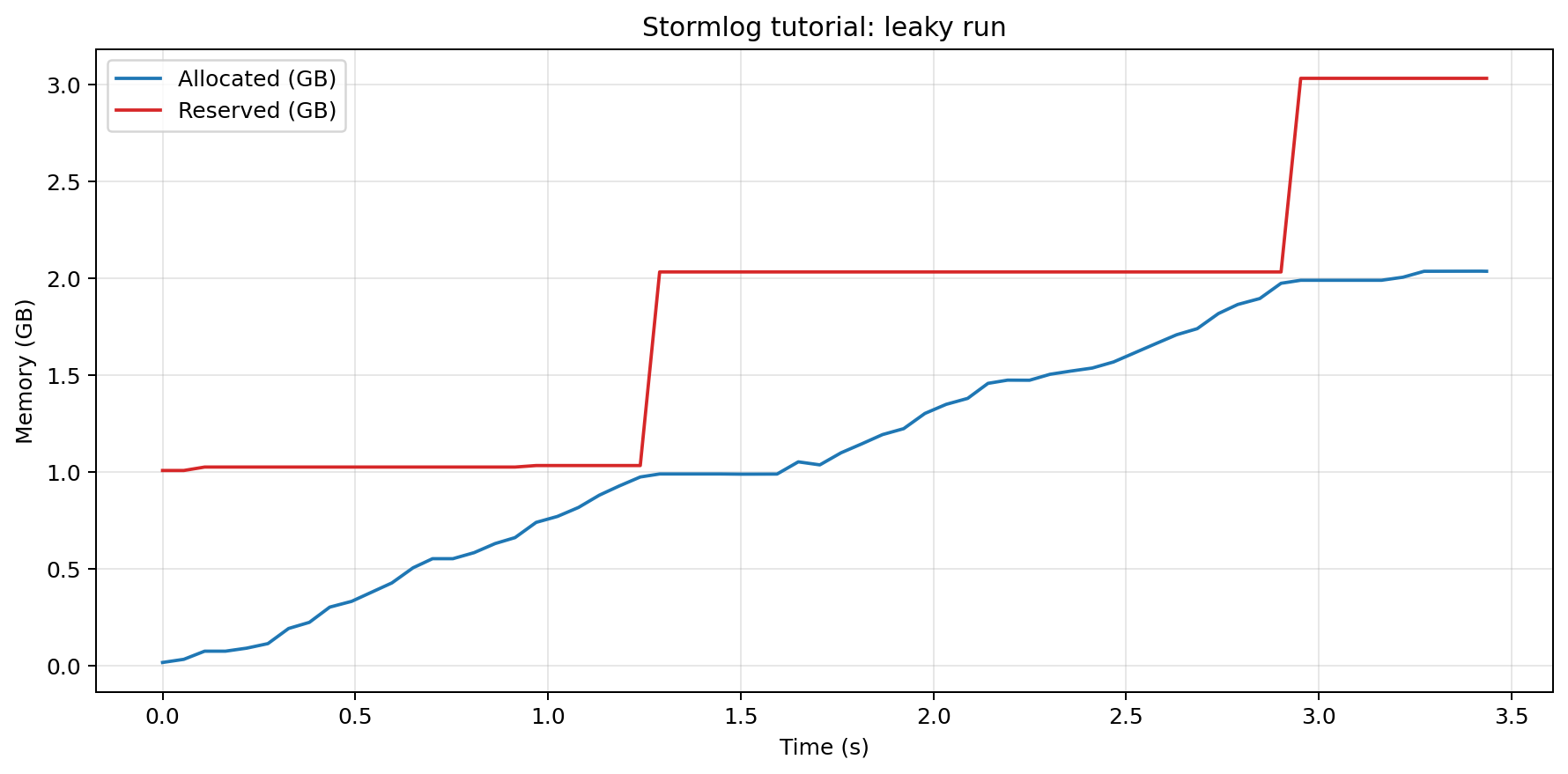
1,074,266,112bytes - peak allocated memory:
2.04 GB - peak reserved memory:
3.03 GB - allocated slope:
637.5 MB/s
That is the sort of run that looks acceptable if you only watch model metrics and obviously unhealthy once memory stability matters.
Baseline, leaky, and fixed runs on the same workload. The shape of the problem is obvious once the runs are side by side.

To reproduce the clean and leaky runs:
python scripts/02_train_baseline.py
python scripts/03_train_with_leak.py
Stormlog turns the run into evidence
This is where Stormlog becomes useful. I do not just want to know that memory is drifting while I watch a terminal. I want the run to leave behind something I can inspect after the fact.
The first selling point is how little code it takes to get there. The tracker helper starts with the public import:
from stormlog import MemoryTracker


def create_tracker(
    *,
    device: torch.device,
    enable_oom_flight_recorder: bool,
    oom_dump_dir: Path,
) -> MemoryTracker:
    tracker = MemoryTracker(
        device=tracker_device_arg(device),
        sampling_interval=config.TRACKING_INTERVAL_SECONDS,
        enable_alerts=True,
        enable_oom_flight_recorder=enable_oom_flight_recorder,
        oom_dump_dir=str(oom_dump_dir),
        job_id="stormlog-tutorial",
    )
    tracker.set_threshold("memory_warning_percent", 70.0)
    tracker.set_threshold("memory_critical_percent", 85.0)
    return tracker
That import is the point. I am still in ordinary PyTorch code, but now the run has a tracker, alert thresholds, and an OOM flight recorder. The training loop itself only needs a thin wrapper around the work it was already doing:
tracker = create_tracker(
    device=device,
    enable_oom_flight_recorder=(mode == "leaky"),
    oom_dump_dir=output_dir / "oom_flight_recorder",
)
tracker.add_alert_callback(alert_recorder)
tracker.start_tracking()

try:
    with tracker.capture_oom(context=f"{mode}-training"):
        for features, labels in train_loader:
            logits, hidden = model(features, return_hidden=True)
            loss = criterion(logits, labels)
            loss.backward()
            optimizer.step()
            retention.observe(hidden=hidden, logits=logits, loss=loss, step=global_step)
finally:
    tracker.stop_tracking()
Once the run finishes, I export the tracker state into files I can reopen later:
def export_tracker_artifacts(
    tracker: MemoryTracker,
    *,
    output_dir: Path,
    alert_recorder: AlertRecorder,
) -> dict[str, Path]:
    output_dir.mkdir(parents=True, exist_ok=True)
    events_json = output_dir / "events.json"
    events_csv = output_dir / "events.csv"
    tracker.export_events(str(events_json), format="json")
    tracker.export_events(str(events_csv), format="csv")
That is the real shift in workflow. The run is no longer just a stream of counters that disappears when the process exits. It becomes a set of artifacts:
events.jsonevents.csvtimeline.jsonstats.jsonalerts.jsontimeline.pngtimeline.html
At that point the leak stops being a hunch and starts becoming inspectable evidence.
The leaky run as a saved Stormlog timeline. This is the moment where the problem stops being a hunch and becomes inspectable evidence.
That same baseline/leaky pair now leaves behind something I can inspect, compare, and share.
Post-hoc analysis, with an MPS caveat
Stormlog's analyzer can do more than summarize a single local run. It can classify drift, spot spikes, and work across saved telemetry artifacts. But on MPS, there is an important caveat: allocator and device counters stay closely coupled during live runs, so hidden-gap analysis is not the main signal on this platform.
That is why this walkthrough includes a saved replay artifact. I wanted to show the analyzer path that becomes especially useful on gap-capable backends like CUDA and ROCm, without pretending that live MPS exposes the same shape of evidence.
The replay data is generated to contain persistent drift and a few spikes:
rank0_reserved = 850 * 1024**2 + index * 10 * 1024**2
rank0_gap = 320 * 1024**2 + index * 10 * 1024**2
if index in {18, 37, 55}:
    rank0_gap += 384 * 1024**2
That lets the analyzer exercise exactly the behaviors I wanted to highlight:
- persistent drift detected with linear regression
- transient spikes detected with z-scores
- rank-aware attribution across a multi-rank replay
In this run, the single-rank replay reported:
- persistent drift at
100.43 MB/s R² = 0.88- one transient spike with max z-score
2.5
Then the combined multi-rank replay showed:
- participating ranks:
0, 1, 2 - missing ranks:
none - cluster onset:
1700000002000000000 - top first-cause suspect:
rank 0
That is the point where Stormlog becomes more than a local memory logger. It is the same analyzer, applied to durable telemetry, and it scales to the kinds of runs where allocator state and device usage diverge or where more than one rank is involved.
A replay artifact that exercises Stormlog's gap analysis path: persistent drift, transient spikes, and rank-aware attribution.

To rerun the analysis section:
python scripts/06_run_cli_analyze.py
Diagnostics and the TUI reuse the same evidence
One of the things I wanted from Stormlog was continuity. I did not want one tool for live tracking, another for analysis, and yet another for interactive inspection, all with different data formats and different mental models.
That is why the diagnostics bundle and the TUI matter. They reuse the same underlying evidence rather than forcing me to start over.
For this walkthrough, I use gpumemprof diagnose as a portable environment snapshot and risk summary. On this MPS-centered tutorial, the in-process tracker remains the main source of truth for the live leak, but the diagnose output is still useful as something I can save, inspect later, or attach to a triage flow.
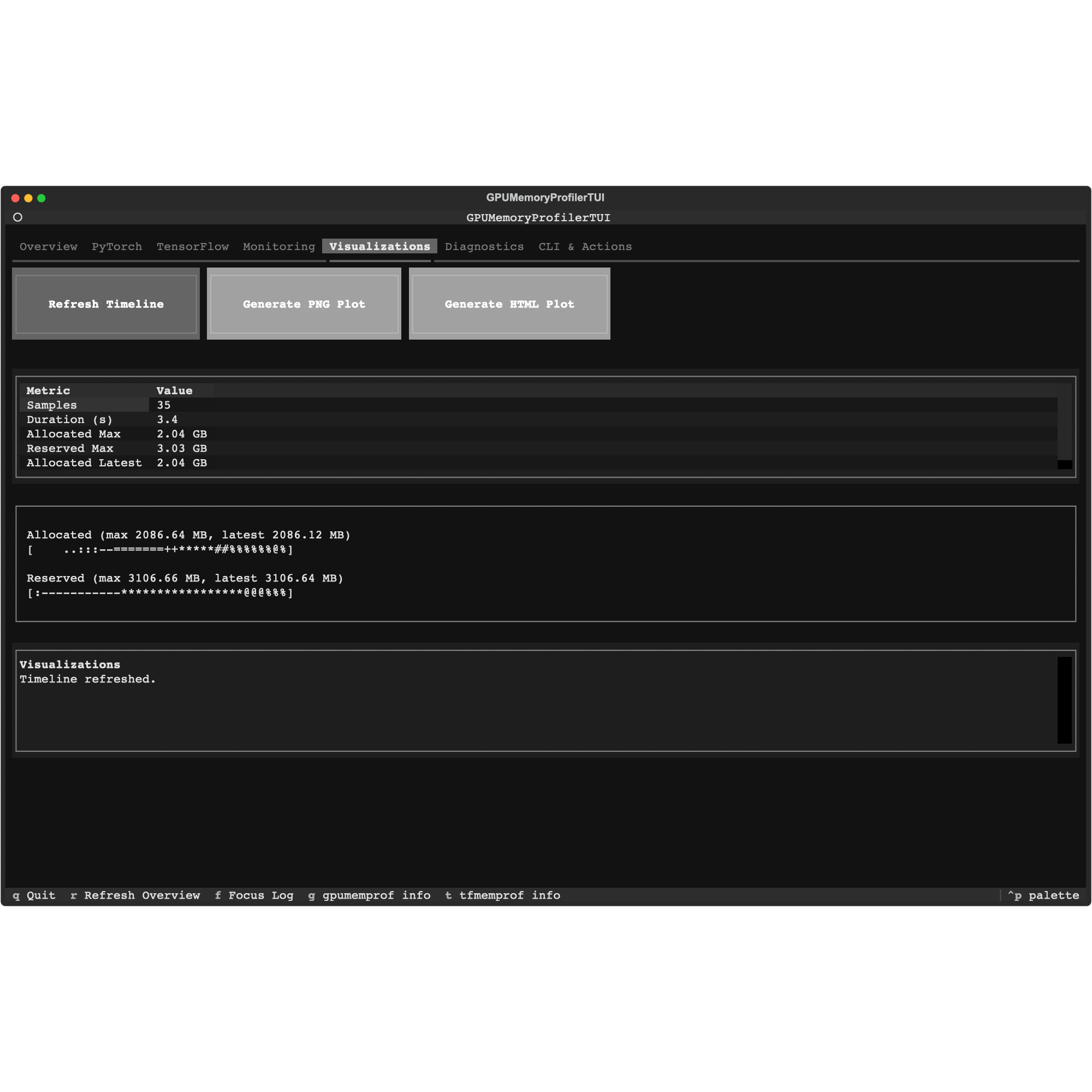
The TUI then gives me a way to load those saved artifacts visually instead of rebuilding my own plotting workflow every time. The value is not just that it looks nicer. The value is that the same run can move from live tracking to saved timeline to post-hoc analysis to interactive inspection without changing formats halfway through.
The Diagnostics tab, loaded from saved artifacts rather than a live session.

The Visualizations tab, using the exact same evidence generated by the training run.
To rerun the diagnostics step:
python scripts/07_run_cli_diagnose.py
The TUI itself is launched with:
stormlog
Push it into a real OOM
I also wanted this walkthrough to cross an actual failure boundary. A gentle upward curve is useful, but it is even more useful to see what happens when the runtime finally refuses another allocation.
The worker that forces the failure is simple:
for step in range(config.OOM_MAX_STEPS):
    chunk = torch.randn(
        config.OOM_CHUNK_ROWS,
        config.HIDDEN_DIM,
        device=device,
    )
    allocations.append(chunk)
I run that worker in a subprocess. If it hard-fails on a real OOM, I do not want the rest of the walkthrough to disappear with it. That isolation makes the failure reproducible without making the whole tutorial brittle.
The important part is not just that it crashes. The important part is that Stormlog captures what happened around the crash through the flight recorder and the saved artifacts.
On this machine, the isolated OOM worker:
- set the MPS memory fraction to
0.2 - completed
33allocation steps - failed on a real MPS OOM
- wrote an OOM dump bundle to
artifacts/oom/worker/oom_dumps/...
The runtime error was:
MPS backend out of memory ... max allowed: 2.13 GiB ... Tried to allocate 64.00 MiB
To reproduce that boundary-crossing step:
python scripts/08_trigger_real_oom.py
Fix the bug, not just the symptom
The fix is not "track memory more often" or "clear caches more aggressively." The fix is to stop retaining device tensors in the first place while still keeping enough information to inspect what the model was doing.
The replacement retention strategy keeps bounded scalar summaries instead. The reductions still happen on the active device. What changes is what gets retained: instead of keeping full MPS tensors alive, it copies back only a few scalar results.
class ScalarSummaryRetention:
    def __init__(self, max_items: int = 24) -> None:
        self.summaries: deque[dict[str, float]] = deque(maxlen=max_items)

    def observe(
        self, *, hidden: torch.Tensor, logits: torch.Tensor, loss: torch.Tensor, step: int
    ) -> None:
        hidden_mean = hidden.detach().float().mean()
        hidden_std = hidden.detach().float().std()
        logit_max = logits.detach().float().max()

        self.summaries.append(
            {
                "step": float(step),
                "hidden_mean": float(hidden_mean.cpu().item()),
                "hidden_std": float(hidden_std.cpu().item()),
                "logit_max": float(logit_max.cpu().item()),
                "loss": float(loss.detach().cpu().item()),
            }
        )
That is the difference between retaining full device tensors and retaining a few host-side scalars derived from them. The summaries are still useful. They are just no longer competing with the training job for device memory.
After the fix, the run finished with:
- validation accuracy:
94.69% - cached device tensors retained:
0 - peak allocated memory:
0.091 GB - allocated slope:
3.6 MB/s
That puts the memory profile back near the healthy baseline instead of the leaky curve.
After the fix, the run returns to something close to the healthy baseline instead of climbing toward failure.

To rerun the fixed pass and compare all three states:
python scripts/09_train_fixed.py
python scripts/10_compare_runs.py
Why this workflow feels different
PyTorch's own counters are useful, but they only cover the first few minutes of the debugging loop. What I wanted was a workflow that could move cleanly through the whole sequence:
- watch memory while the job runs
- save the telemetry as an artifact
- analyze it after the fact
- capture a diagnostic bundle
- reload the same evidence in a TUI
- compare the broken run against the fix
That is the gap Stormlog is trying to close.
What this walkthrough does not cover
This article is intentionally local and PyTorch-first.
Stormlog already goes beyond that:
- TensorFlow backend support via
stormlog.tensorflow - distributed diagnostics and rank-aware views
- cross-rank timeline visualization
- CI-oriented artifact workflows
- CUDA/ROCm-specific runtime paths where hidden-gap analysis becomes especially interesting
Those deserve dedicated follow-up walkthroughs. This post is the first practical entry point, not the full map.
Run the full walkthrough
If you want the exact same sequence from the companion repo:
bash run_all.sh
If you run into issues, want to understand more of the surface area, or want to follow where Stormlog is going next:
- Repository and issue tracker: https://github.com/Silas-Asamoah/stormlog
- Documentation: https://stormlog.readthedocs.io/en/latest/
- Companion code: https://github.com/Silas-Asamoah/stormlog_tutorial
Stormlog exists because I wanted a memory-debugging workflow that stayed useful after the first failure instead of forcing me back into ad hoc scripts and one-off profiler snapshots. If that sounds familiar, start with the baseline run, break the training loop on purpose, and inspect the saved artifacts. That is still the fastest way to understand what the tool is designed to do.